No servers · No accounts · No limits

The Chat That
Connects Billions

Chat K10 is a fully decentralized P2P communication platform. Messages travel directly between browsers — no company, no storage, no surveillance. From a private conversation to a global network with billions of users. Now with YouTube Streaming & Live Chat — directly in the main chat interface.

Users possible
0
Intermediaries
3
Operation modes
YouTube Live Chat
P2P Connected
YouTube Live Chat ON
chat-k10-desktop
Chat K10
Private P2P
Group Rooms
DJ Radio
Video Call
File Share
YT Live Chat
Back to matematico10.com.br  ·  Developed by Prof. Paulo Sérgio  ·  YouTube Live Chat available in Chat Desktop
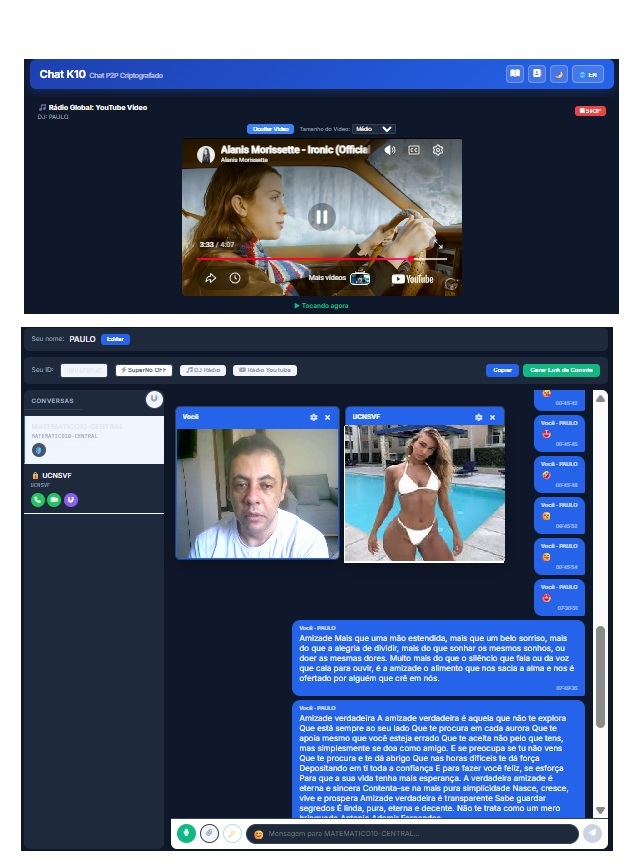
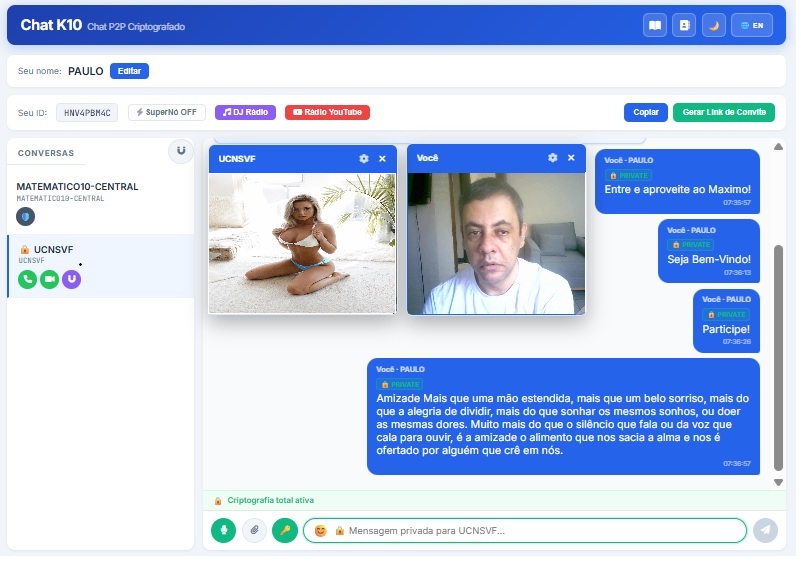
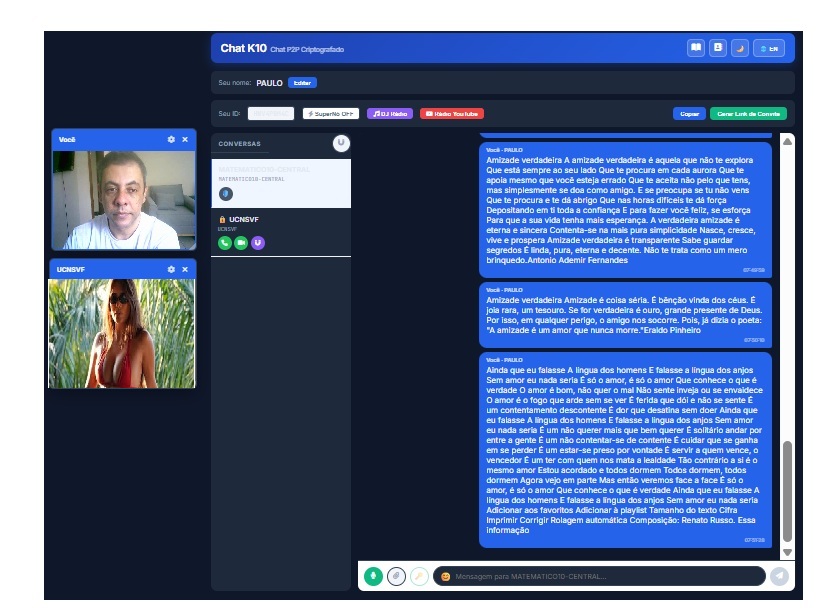
Chat K10 Interface
Chat K10 Features
Chat K10 Network
Technology

How Chat K10
Really Works

Unlike WhatsApp, Telegram or Discord — Chat K10 connects users directly, browser to browser. No company stores anything.

Unique Peer ID

Each user gets an automatic 6-character alphanumeric ID (A–Z, 2–9). This is your address. Share it with whoever you want to talk to.

Direct Browser Connection

Once both users are online, the connection is established directly between browsers via WebRTC. Messages, files, audio and video travel through this encrypted tunnel.

Spider Web / Hydra Network

In group mode each node connects to multiple others and re-transmits messages. The more people, the more powerful the network — no single point of failure.

A3B X7K M2Q P9R Z5W YTLIVE YOU K10 Peer-to-Peer — Everyone connected directly
Available in Chat Desktop

YouTube Streaming &
Live Chat Integration

Stream YouTube videos and embed Live Chats directly inside Chat K10 Desktop. Each user can broadcast their own stream, appearing in floating windows for all peers via P2P.

AVAILABLE HERE

Chat K10 Desktop

The YouTube Radio button is built into the main chat toolbar. Open Chat Desktop.HTML, paste the YouTube URL and all peers receive the video stream in a floating window automatically.

ALSO IN SERVER

Servidor K10 (optional)

The server panel also has a "Start YouTube Chat" button that syncs the chat when clients connect through the central server — but you don't need to run a server to use this feature.

Chat Desktop · Floating Windows

Multi-User Video
Streaming

Click "YouTube Radio" in the Chat Desktop toolbar. Paste any YouTube URL. The video embeds instantly for every connected P2P peer in a draggable, resizable window.

  • Each user can stream their own YouTube video simultaneously
  • Floating windows can be moved and resized anywhere
  • Next Camera 🔄: Cycle through available streams in any window
  • Display up to 10 simultaneous video windows for performance
  • New users joining mid-session receive active streams automatically
  • Optional: Broadcast YouTube Live Chat side-by-side
youtube.com/live_chat · Live
Chat Nativo K10
Chat YouTube
@viewer_global
Amazing stream! 🔥
@student_paulo
can you repeat the question?
You (via K10)
Sure! Great question 👍
@anon_user
this chat is incredible
Send a message…

How to Use YouTube Streaming — in Chat Desktop

🖥️

Step 1 — Open Chat Desktop

Open Chat Desktop.HTML. No installation or server required — just open the file directly.

🔗

Step 2 — Click "YouTube Radio"

Find the "YouTube Radio" button in the toolbar. Paste any YouTube URL to start your stream.

📺

Step 3 — Floating Windows

The video appears in a floating window for everyone. Use the 🔄 icon to switch between different users' cameras or streams.

Step 4 — Stop Stream

Click "Stop YouTube Radio" to end your broadcast. The window will close for all peers.

Operation Modes

Three Modes, One Platform

From a private conversation to a network of billions — Chat K10 adapts to any scale.

Mode 1 — Direct P2P

Connect directly to another person using their ID. No server in the middle — completely private.

  • Text, files, audio & video
  • End-to-end encryption (E2EE)
  • Voice and video calls
  • DJ Radio synchronized audio
  • ◉ YouTube Live Chat broadcast
Ideal for private conversations

Mode 2 — K10 Server

One person opens the server and shares their ID. All others connect to it for a shared group room.

  • Up to 200 simultaneous users
  • Real-time statistics dashboard
  • Global Radio for everyone
  • YouTube Live Chat relay support
  • Active connection monitoring
Ideal for groups & communities

Mode 3 — Spider Web / Hydra

Each user also becomes a relay node. Messages propagate automatically. No user limit whatsoever.

  • Theoretically unlimited users
  • SuperNode to boost signal
  • Self-healing network
  • YouTube Live Chat across the web
  • No central point of failure
Ideal for massive global networks
Full Feature Set

Everything You Need to Communicate

Far more than text messages — a complete platform for all forms of real-time communication.

◉ YouTube Live Chat IN CHAT DESKTOP

Built directly into Chat Desktop.HTML — no server needed. Click Broadcast YouTube Chat Link in the toolbar, paste any YouTube Live URL, and the embedded live chat tab propagates to every connected P2P peer automatically via the message relay system. Stop it any time with one click.

  • Available in the main chat toolbar — works without a K10 Server
  • Dual-tab interface: Native K10 Chat + YouTube Live Chat
  • Auto-propagation via P2P — no manual sharing needed per user
  • New joiners automatically receive the active chat via handshake
  • Works with any public YouTube Live URL or Premiere

Voice Call

Direct P2P voice call with adjustable volume and no time limits imposed by the system.

Real-Time Text Chat

Instant messages with emoji panel, timestamps, sender names, and multi-conversation sidebar. Handles thousands of messages per session seamlessly.

Video Call

High-quality video with floating draggable windows. Multiple simultaneous streams supported.

🎵 DJ Radio

The DJ broadcasts synchronized audio to all connected users at the exact same moment — a real radio station inside the chat.

  • Perfectly synced start for all listeners
  • Upload any audio file as DJ
  • YouTube Radio integration
  • Global Radio via server
  • Timestamp-based precision sync
  • Per-user volume control

File Transfer

Send documents, images and videos directly — no system-imposed size limit.

Audio Messages

Record and send voice messages directly from the browser with one click.

Torrent / P2P File Sharing

Share large files using the built-in torrent system. Files are distributed between network users — more people downloading means faster transfer for everyone.

End-to-End Encryption

Enable E2EE for private chats. Encrypted in your browser, decrypted only on the recipient's device.

SuperNode Mode

Transform your connection into a network relay. Strengthen the Hydra web for all users.

Invite Links

Generate a shareable link. Anyone who clicks connects instantly — no ID copying needed.

Contact Book

Save contacts by name and ID. Reconnect with a single tap — no memorizing IDs.

Bilingual EN / PT

Complete interface in English and Portuguese. Switch language instantly at any time.

Network Capacity

A Network Without Boundaries

From a private conversation to billions of simultaneous users — how Chat K10 grows organically.

2–50

Direct P2P

Private conversations and small groups. Each person connects directly. Perfect for families, friends and teams.

200

Per K10 Server

Each active server handles up to 200 simultaneous users. Events, classes, communities, online conferences.

Spider Web / Hydra

Multiple interconnected servers and P2P nodes. No theoretical user limit — billions simultaneously possible.

The Hydra Principle — How It Scales to Billions

🌱

Start Small

Two people talk. Each is a node. Simple and instant.

🔗

Grow Organically

Each new user connects to multiple existing nodes. More people = stronger network.

🕸️

Become the Web

Network becomes a spider web. If one node drops, others continue. Resilient and self-healing.

🌍

Reach Billions

Multiple K10 servers + global P2P nodes = a planetary network with no central control or limit.

Quick Start

Ready in Less Than 60 Seconds

No installation. No registration. No password. Just open the browser and go.

01

Open Chat K10 Desktop

Click "Open Chat Desktop" on this page. Opens directly in your browser — zero installation.

→ Chat Desktop.HTML
02

Enter Your Name

Type your name in the "Your Name" field and press Save. Change it at any time.

Example: Paulo Sérgio
03

Copy Your ID

Your unique 6-character ID appears automatically. Click Copy and share it, or generate an invite link.

Your ID: A3B-K10 → Copy
04

Connect and Chat!

Paste the other person's ID and click Connect. The conversation starts immediately.

Peer ID: X7K → Connect ✓
05

◉ Start YouTube Live Chat

In Chat Desktop.HTML, click "Broadcast YouTube Chat Link" in the toolbar. Paste any YouTube Live URL — the tab instantly appears for all your connected peers. No server required.

Toolbar → Broadcast YouTube Chat → paste URL → all peers receive it
06

Scale to Billions

Multiple people open servers and interconnect them. The Spider Web grows automatically — unlimited users.

Server 1 + Server 2 + P2P → Hydra ∞
Use Cases

Who Uses Chat K10?

Adapts to any scenario — from a private family chat to a global event with millions of participants.

🎓

Teachers & Students

The professor shares their peer ID with the class. Students connect via P2P, chat natively, and the teacher broadcasts the YouTube Live Chat with one click — no separate server needed for a class of 30.

🏢

Companies & Remote Teams

Private P2P conversations between colleagues. Share documents with end-to-end encryption. Messages are never stored on external servers.

🎤

Live Events & Concerts

DJ Radio for synchronized audio + YouTube Live Chat embedded for everyone watching. The broadcaster clicks one button in Chat Desktop — the whole P2P room gets the YouTube live chat tab.

📺

Streamers & Content Creators

Go live on YouTube and broadcast the chat link to your K10 community. Your most engaged fans interact via P2P while the YouTube audience is visible — all inside the same Chat Desktop interface.

🌐

Global Communities

Any community needing censorship-resistant communication. The Hydra network has no single point of failure — nothing to shut down.

🔬

Researchers & Developers

Full source code on GitHub. Study and extend the P2P architecture. The Billions Test Bench is available inside the server panel for load testing.

FAQ

Frequently Asked Questions

◉ Do I need to run a server to use YouTube Live Chat?
No. YouTube Live Chat is a feature of Chat Desktop.HTML — the main chat interface. You just open the file in your browser, connect to peers normally, and click "Broadcast YouTube Chat Link" in the toolbar. The K10 Server (ServidorChatK10.html) also supports it, but it is completely optional.
◉ How does YouTube Streaming work in Chat K10?
Any user in the room clicks the "YouTube Radio" button in the Chat Desktop toolbar and pastes a YouTube URL. The video is streamed to all peers and displayed in a floating, draggable window. Each user can stream their own video, and you can cycle through them using the "Next Camera" 🔄 button.
◉ Is there a limit to how many video windows I can see?
Yes. To ensure smooth performance, Chat K10 displays up to 10 simultaneous video windows (including webcams and YouTube streams). If there are more active streams, you can use the 🔄 button in any window to cycle through the available feeds.
◉ Do new users who join after a stream started also receive it?
Yes. When a new peer connects, they automatically receive information about all active YouTube streams and will display them in floating windows immediately.
Do I need to create an account or register?
No. Chat K10 requires absolutely no registration, email, password or account creation. Just open the browser and start chatting immediately. Your ID is generated automatically and locally in your browser.
Are my messages stored somewhere?
No. Messages travel directly between users' browsers. They are not stored on any server. When you close the browser, all conversation history disappears unless you manually save it.
What is the maximum number of users the network supports?
In Server Mode each server supports up to 200 users. In Spider Web / Hydra mode, where each user also becomes a relay node and multiple servers interconnect, the network has no theoretical limit. Billions of users can be supported simultaneously through distributed infrastructure.
Do I need to install anything?
No installation required. Chat K10 runs entirely in the browser using WebRTC and PeerJS. Just open the HTML file or access the link and start using it immediately.
What is the DJ Radio and how does it work?
DJ Radio is a synchronized audio broadcast feature. The DJ uploads an audio file or uses YouTube Radio, and the system calculates and syncs the playback start time for all users connected to the chat. Everyone hears the exact same audio at the exact same moment — like a real radio station inside the chat.
What is SuperNode mode?
SuperNode mode transforms your connection into a message relay point in the Hydra network. It strengthens the overall network signal, allows more users to discover each other, and increases the reach of the Spider Web. Recommended for users with stable, fast connections.
Is it possible to use it on mobile?
Yes. The interface is fully responsive and works in any modern mobile browser. Just open the Chat Desktop link on your phone and use it normally — no app download needed.
Ready to Chat
Without Limits?

Open the chat, get your ID, share with whoever you want to talk to. YouTube Live Chat is built right in. No account. No data collection. Yours.